Live map & trails
Follow aircraft across the map. Filter by airline, aircraft type or flight phase, and explore their recent tracks.
For iPhone, iPad & Android
Find aircraft nearby, follow a journey and keep the sky a glance away. Start free, with no account and no ads.
Explore Watch the Sky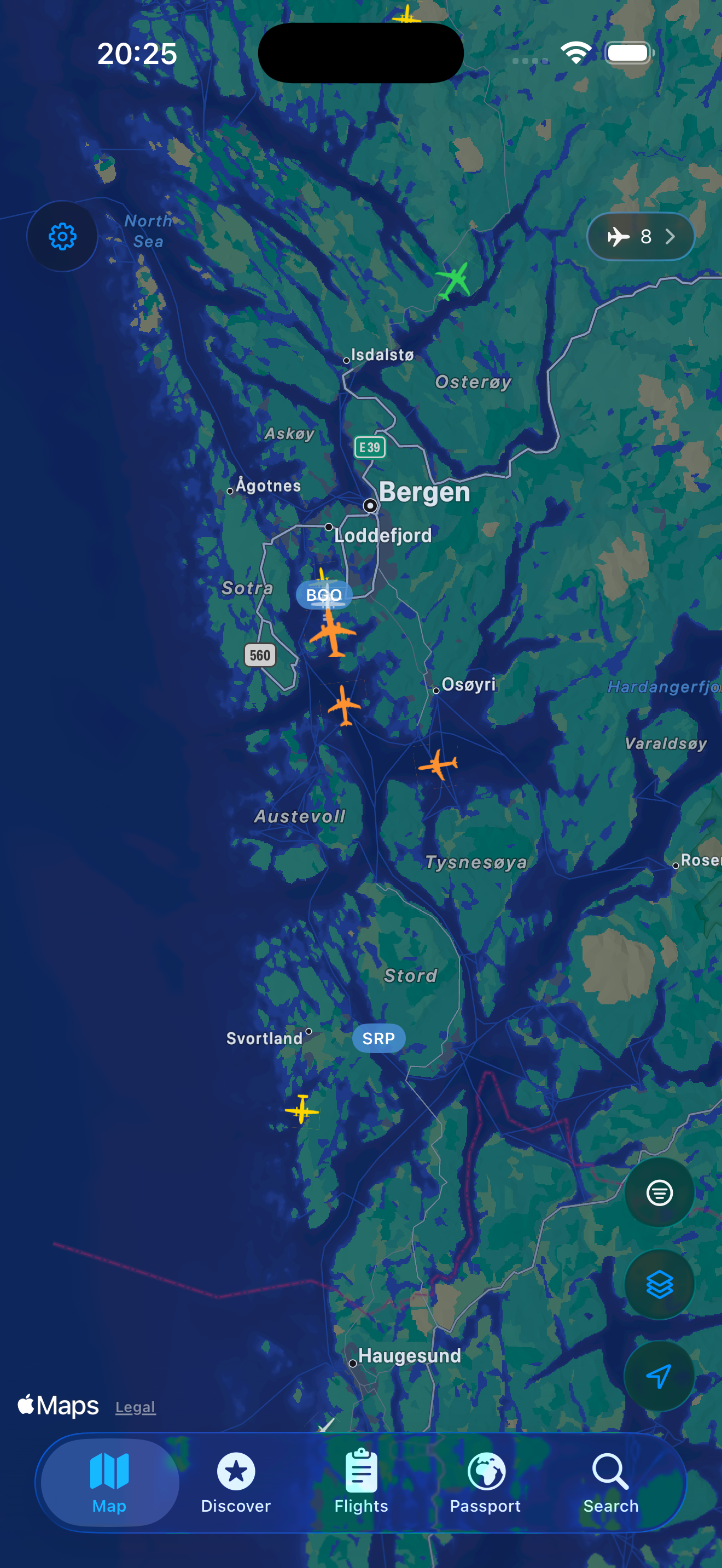
Watch the Sky shows an aircraft near your saved place, its distance, direction and how high to look. No need to open the app just to find out what is overhead.
Watch aircraft near home, or see your next saved flight with its gate and departure time.
On iPhone, choose a rectangular widget or a compact line to watch aircraft near your saved place, even when you have an upcoming flight.
Sky widgets are free. Readings update periodically; open Contrail for live tracking. Home Screen widgets are available on iOS and Android; Lock Screen widgets are for iPhone.
Explore live traffic, keep an eye on a trip, or build a logbook of the places you have been.
Follow aircraft across the map. Filter by airline, aircraft type or flight phase, and explore their recent tracks.
See available routes, altitude, speed, aircraft photos and registration. Check the age of the latest position.
Save a flight by number and date. Follow its status, gate, delays and the aircraft operating the inbound journey.
Find flights, registrations and airports. Browse available arrivals, departures, gates and local airport times.
Keep past journeys, maps and travel statistics. Import CSV from Flighty, Flightradar24 and OpenFlights, and export an OpenFlights-compatible CSV. iCloud logbook sync is available on iOS.
Explore airport weather, METAR observations, aurora forecasts and glider activity. Pro adds selected weather and airspace layers.
Coverage, timetables and aircraft details depend on the available data. Contrail is for exploration, not flight navigation.
Contrail Pro adds alerts, watchlists and more ways to explore. Check current plans, prices and any eligible trial in the app.
Choose notifications for detected gate changes, delays, departures, arrivals and baggage updates.
Keep one journey on your Lock Screen and, on supported iPhones, in the Dynamic Island.
Explore military, government and other notable aircraft. Get alerts when activity is detected for aircraft you follow.
Replay supported past flights in 3D. Explore the timeline and camera views; some routes are reconstructed or incomplete.
Explore SIGMET hazards, UK military airspace, holding patterns, activity corridors and the gliders-only filter.
Watch the Sky, basic tracking, Passport CSV import/export and emergency-squawk alerts remain free. A sky widget and a Pro Live Activity serve different purposes.
Explore Contrail Pro in the appAvailable on iOS
Full English, Norwegian Bokmål, German, Spanish and French across the app, widgets and Help. A new welcome guide explains how to get more from Contrail, with improved virtual Fly along views.
These features are available in the current iOS release. Features and language support can differ by platform and version.
Open the map and tap an aircraft to explore its available details.
Add a flight number and date to My Flights. Choose alerts separately if you have Pro.
Pick a saved place in the app, then add Contrail from your device’s widget gallery.
Find a plane, add a widget or bring your flight history along.
Identify a nearby aircraft with Contrail. Find its route, altitude and registration, then use Watch the Sky to see which direction to look.
Set up Contrail’s free Watch the Sky widget on iPhone or Android. See nearby aircraft, direction and viewing angle, with iPhone Lock Screen options.
Keep your travel history in Contrail’s Passport. Import CSV exports from Flighty, Flightradar24 or OpenFlights, review your flights and export a backup.
Explore without signing up. Optional notifications use the information needed to deliver your alerts. On iOS, your logbook syncs when iCloud is available for Contrail.
Privacy policy (English)